Summary
GUIs are dead—at least for most user experiences. This post describes a BYU capstone project where five seniors built a conversational interface for Manifold using MCP and picos. The result shows how natural language can replace a GUI entirely, letting users create, tag, and manage digital things through dialogue instead of learning a standard graphical user interface.
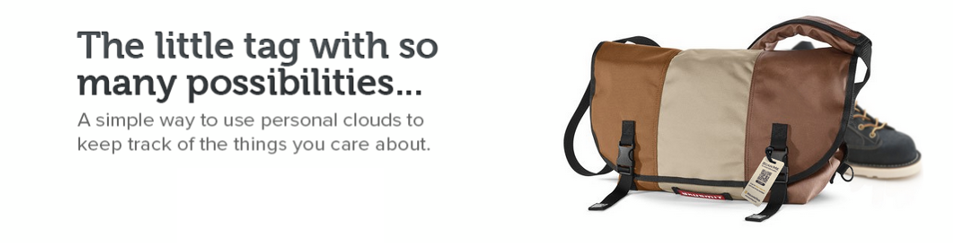
Every winter semester, I like to sponsor a capstone project for BYU computer science seniors. This year, I worked with five students—Micaela Madariaga, Braydon Lowe, Chance Carr, Charles Butler, and Jayden Hacking—on a project I had been thinking about for a while: building a conversational interface for Manifold. Manifold is a platform built on the pico engine that enables the creation and orchestration of pico-based systems.
Manifold started as a system for putting QR codes—what we call tags—on physical things like your bag, your bike, or even a dog. We called it SquareTag. Each tagged thing gets a pico that stores owner information and can be scanned by anyone who finds it. Over time, we added the ability to install other skills on thing picos, extending what they can do. We even built a connected car platform called Fuse on the same architecture, where each vehicle is a pico with rulesets for tracking fuel usage, maintenance, and trips. Manifold is the general-purpose platform for creating and managing these pico-based systems.
Manifold is powerful, but like any GUI, there are a number of concepts that users have to learn before they can do anything useful. I wanted to know whether a conversational interface could let people interact with Manifold with less friction. The answer turned out to be yes. The team was able to create a usable conversational interface for Manifold that exposes the primary features and makes it easy to use. The interesting part is the architecture that provides a Model Context Protocol (MCP) interface to a constellation of picos and the APIs they expose. That combination separates concerns in a way that gives you a conversational layer without sacrificing the structure and reliability of the underlying system.
Manifold and the Expert Barrier
Manifold gives each user a collection of digital representations of physical things. Each of these is represented by a picos. Each thing in Manifold can have tags for physical identification, journal entries for notes, and owner information for recovery. The GUI presents these as a grid of cards, each showing the thing's name, its tags, and recent journal entries:
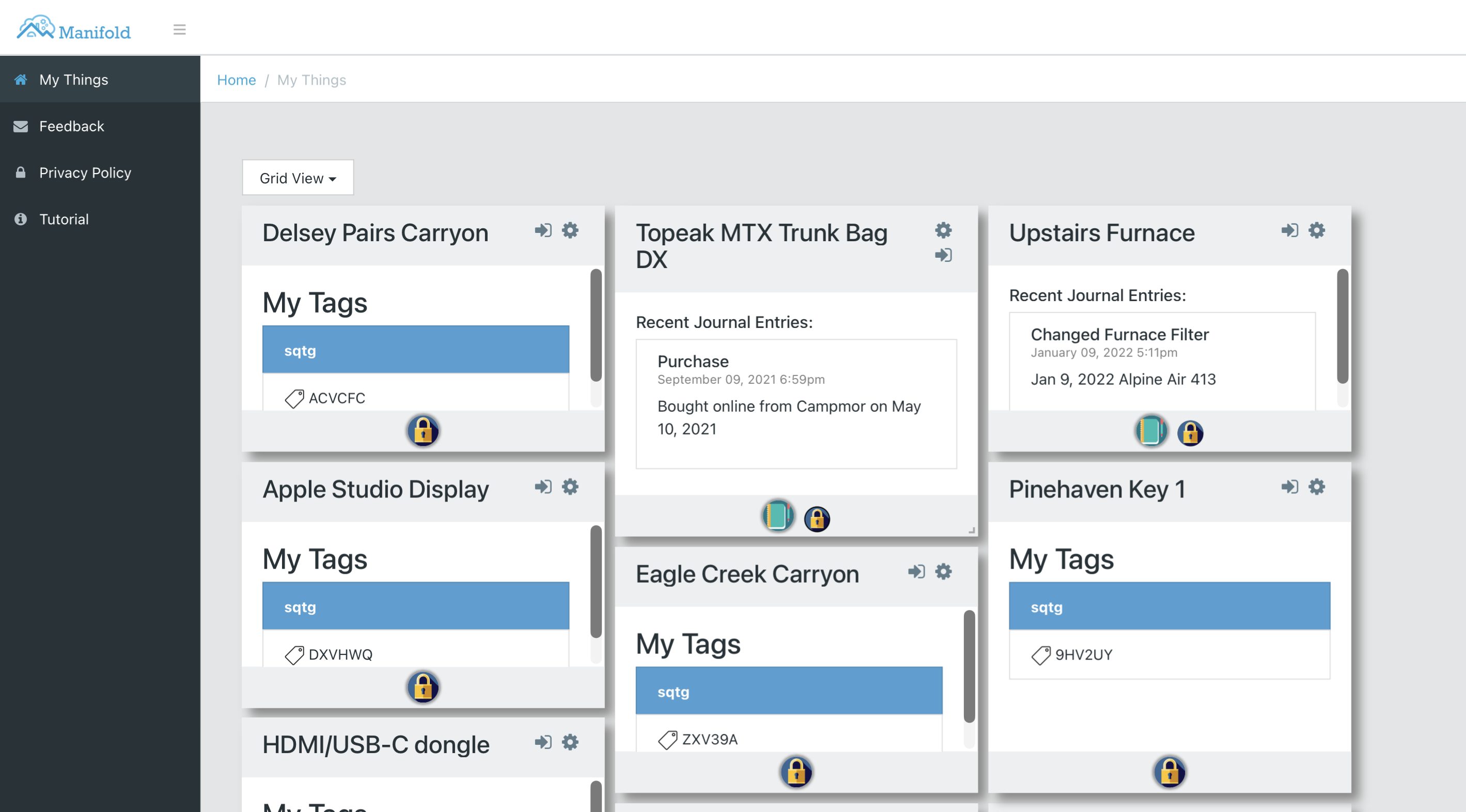
This works if you already understand the system. You can see that the Delsey carry-on has a SquareTag attached, that the furnace has journal entries tracking filter changes, and that each thing has its own set of installed skills. But creating a new thing, assigning a tag, or adding a journal entry requires navigating through multiple screens and understanding concepts like skills, communities, and tag domains. For someone encountering Manifold for the first time, the GUI is a wall of concepts that have to be learned before anything useful can happen.
That is the gap we wanted to bridge. Instead of requiring users to learn the GUI's mental model, we wanted to let them say "create a thing called Running Shoes" or "add a note to the toy car" and have the system figure out the rest. The question was whether we could build that conversational layer without losing the structure and reliability that makes Manifold useful in the first place.
What Conversational Interfaces Are Really About
The wall-of-concepts problem I just described is not unique to Manifold. It is the fundamental problem with GUIs. Every GUI requires users to learn its particular model of the world before they can accomplish anything: which menu holds the operation they want, what the icons mean, how the screens connect to each other, what has to happen in what order. We have spent decades building GUIs and we have gotten good at it, but the core limitation remains. The user has to learn the tool's language rather than the tool learning theirs.
I think GUIs are dead—at least for most user experiences. Conversational interfaces are not a convenience layer on top of a GUI; they are a replacement for it. A conversational interface is a translation layer between human intent and system behavior. The user says "create a backpack" and the system figures out the rest. The user does not need to know about skills, communities, tag domains, or which screen to navigate to. They just say what they want. The system's capabilities can be discovered and exercised through dialogue rather than through a visual hierarchy that someone had to design and someone else has to learn. Better still, a conversational interface can explain what it is doing and why, teaching users about the system as they use it.
The Architecture
The capstone team designed a pipeline architecture that has six components. The diagram shows what the team built (the green boundary) and the two external services it connects. The code is on GitHub.
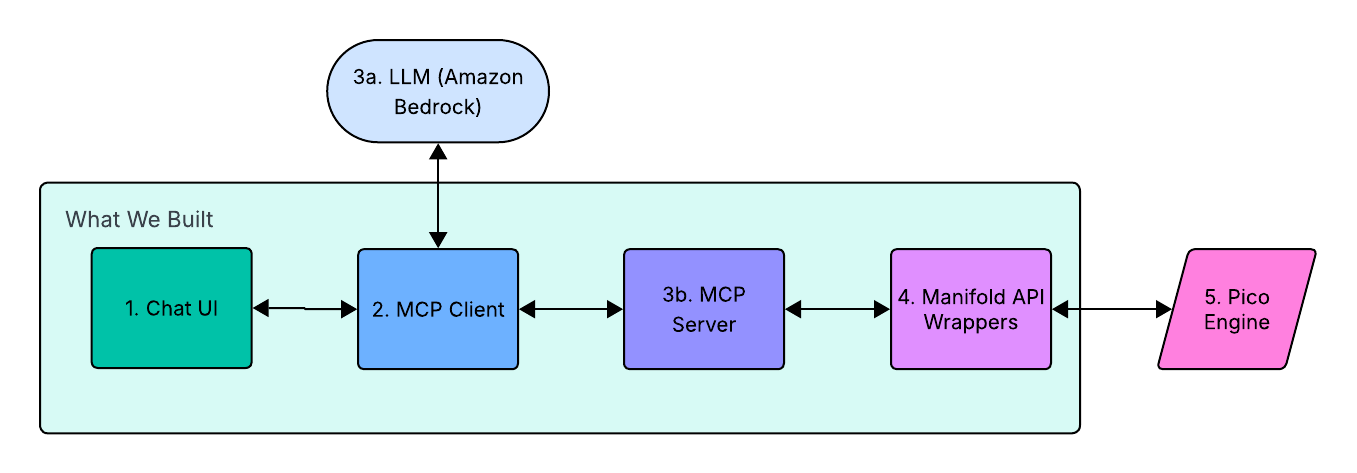
- Chat UI (1) — A React frontend that handles user interaction and displays responses. It connects to the MCP Client via Socket.io for real-time status updates during tool execution.
- MCP Client (2) — The central coordinator. It receives user messages from the Chat UI, packages them with available tool definitions, and sends them to the LLM. When the LLM returns a tool-call instruction, the MCP Client routes it to the MCP Server for execution.
- LLM (3a) — Claude, accessed via Amazon Bedrock. This sits outside the team's code. It examines the available tools, interprets the user's intent, and returns structured JSON instructions specifying which tool to call and with what arguments.
- MCP Server (3b) — Exposes system capabilities as callable tools with JSON Schema definitions. Each tool maps to a specific KRL operation. The server communicates with the client over
stdio, a standard MCP transport that keeps things simple. - Manifold API Wrappers (4) — Translates MCP tool calls into HTTP requests to the pico engine, using a uniform JSON envelope for both raising events and making queries to the right pico.
- Pico Engine (5) — Also outside the team's code. It supports the execution of KRL rules and functions inside the pico constellation representing the owner's things. This is where the actual work happens.
Each component in this architecture does one thing. The LLM handles intent and language. MCP structures that intent into well-defined tool calls. The API wrappers translate those calls into pico engine operations. The pico engine executes them reliably. No single component needs to understand the full stack, and the team's code is cleanly bounded between the two services it connects.
How a Request Flows Through the System
Consider what happens when a user types "create a backpack" into the chat interface. The diagram shows the full request lifecycle:
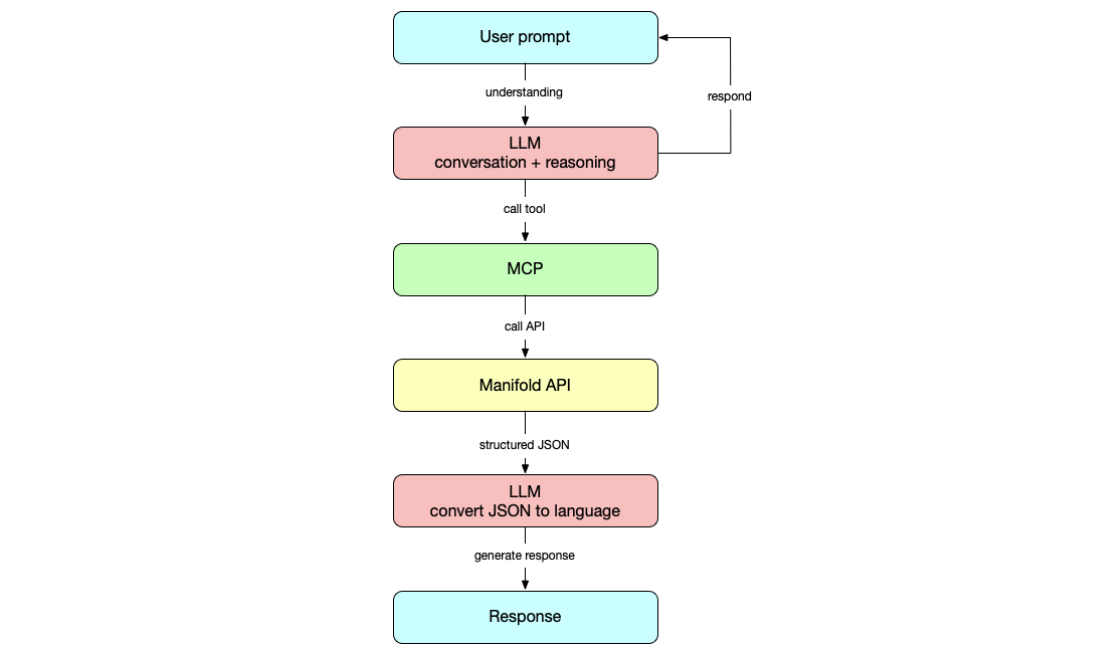
The user's prompt goes to the LLM, which reasons about the intent and determines that it needs to call a tool. MCP translates that into a structured tool call—in this case, manifold_create_thing with the argument name: "Backpack". The tool call hits the Manifold API wrappers, which send the appropriate request to the pico engine. The engine returns structured JSON, which flows back to the LLM. The LLM converts the result into natural language and generates a response for the user. Notice that the LLM appears twice: first to understand intent and select a tool, then to convert the structured result into a human-readable reply.
The round trip takes a few seconds. From the user's perspective, they asked for a backpack and got one. From the system's perspective, the engine executed a rule inside the right pico with the right attributes, validated at every layer. Both views are accurate; the architecture just makes them compatible.
The Uniform Envelope
One design decision worth highlighting is the uniform JSON envelope the team created for all pico engine calls. Picos support two kinds of operations: queries (read state) and events (change state). Rather than handling these differently throughout the stack, the team built an adapter that normalizes both into a single request/response shape. Note the eci field in the envelope: that is the Event Channel Identifier, which identifies the specific pico representing the thing that the operation is being performed on.
// Request envelope
{
  "id": "correlation-id",
  "target": { "eci": "ECI_HERE" },
  "op": {
    "kind": "query",          // or "event"
    "rid": "io.picolabs.manifold_pico",
    "name": "getThings"
  },
  "args": {}
}

// Response envelope
{
  "id": "correlation-id",
  "ok": true,
  "data": { ... },
  "meta": {
    "kind": "query",
    "eci": "ECI_HERE",
    "httpStatus": 200
  }
}
This is a small thing that makes a big difference. Every tool in the MCP server returns a response with the same shape. Error handling follows the same pattern regardless of whether the underlying operation was a query or an event. The LLM sees consistent results, which makes its responses more predictable. Uniformity at this layer reduces complexity everywhere above it.
Skill Gating
One of the distinctive features of picos is that new functionality can be installed at runtime by adding KRL rulesets. Every Manifold pico comes with the safeandmine ruleset installed by default, which handles tagging and owner information. Other rulesets, like journal for notes, are installed on demand. Each ruleset brings its own API—new events it can handle, new queries it can answer. This is powerful, but it makes building a conversational interface harder because the set of available operations is not fixed. It changes per pico, and it can change during a conversation.
The team handled this by building a skill-gating system that dynamically controls which MCP tools the LLM can see, based on the rulesets installed on the current pico. If a pico does not have the journal ruleset installed, the LLM never sees the addNote or getNote tools. This prevents the LLM from attempting operations that would fail, and it creates a natural conversational flow around capability discovery. If a user asks to add a note to a pico that lacks the journal skill, the system explains what is missing and asks permission to install it. The interaction feels natural because the architecture supports it; the LLM is not guessing about what is possible.
Prompt Engineering as Interface Design
The team went through multiple iterations of their system prompt before arriving at something that worked well. As they describe in their prompt design document, the prompt is not just instruction text; it is a control surface for live conversational behavior. It constrains response length to 1-3 sentences for demo readability. It enforces skill-gating in the prompt itself, not just in code, so the LLM explains missing prerequisites and asks permission before installing new capabilities. It tracks a "last used thing" so users can say "tag it" or "rename that" without repeating themselves. It requires explicit confirmation before destructive actions like deleting a pico—a trust pattern as much as a safety pattern, demonstrating that the system can act powerfully but only after checking intent.
These are interface design decisions expressed in natural language rather than code. The team documented their rationale carefully: earlier versions produced responses that were too long, attempted skill-dependent actions without checking installed skills first, and drifted into heavy Markdown formatting that looked out of place in a minimal chat UI. Each iteration tightened the prompt based on observed failures. This iterative approach to prompt engineering mirrors how good interface design works generally. You watch people use it, see where it breaks, and fix the interaction, not just the code.
What Worked and What Didn't
The core architecture works well. A user can create, rename, and delete digital things; organize them into communities; assign physical tags; and add journal notes—all through natural conversation. The layered design means each component can be tested and reasoned about independently. The MCP server has a clean test suite. The uniform envelope makes debugging straightforward because every response has the same shape.
The hardest part, according to the team's lessons learned document, was building the API wrappers. The pico engine endpoints were easy to identify through browser network monitoring, but getting the POST request requirements right and bridging the gap between natural language and the API's expected data formats took significant effort. Debugging was also difficult because the LLM's error messages were vague; the team had to use a separate MCP Inspector to diagnose problems at the tool layer.
LLM hallucination was an ongoing challenge. After hundreds of similar create, edit, and delete operations accumulated in the conversation context, the model's accuracy degraded. The team identified context management—flushing old interactions and keeping the context window focused—as a key area for improvement. They also noted that local testing came late in the development process; earlier access to a local environment would have reduced the noise in the shared context.
What This Means
This project demonstrates something I have believed for a long time: the best technology emerges from solving real problems iteratively rather than from grand design. The students did not start with a theory about conversational interfaces. They started with a concrete problem—Manifold is hard to use if you do not already know how it works—and built their way to a solution that has broader implications.
The combination of MCP and picos is particularly compelling because it plays to the strengths of each component. MCP gives the LLM a structured way to interact with external systems; the model does not need to generate raw API calls or guess at endpoint formats. Picos provide a decentralized, event-driven runtime where each entity maintains its own state and communicates via events. The LLM does not need to understand that architecture. It just needs to know which tools are available and what arguments they take. MCP handles the rest.
The biggest open question is portability. Right now, the system requires hand-written API wrappers for each set of pico engine operations. One of the capstone judges suggested that a more portable approach would generate the necessary tool definitions and wrapper functions from a provided set of API specifications. That would let you point this architecture at any service, not just Manifold. I think that is exactly the right next step, and it is the kind of insight that comes from building something real and showing it to smart people.
I have been building pico-based systems for nearly two decades, and they remain the most interesting technology I have worked on. I've been teaching students at BYU for even longer. This project brought those two things together in a way that was genuinely fun. Micaela, Braydon, Chance, Charles, and Jayden took a system I care about deeply and made it more accessible by building something I had dreamed of creating. That is what working with students does: they see possibilities you have stopped looking for because you are too close to the problem. I am grateful for their work and excited to see where it leads.
Photo Credit: Manifold tag from Manifold (used with permission)