Summary
Some agent actions are too consequential to leave to policy alone. This post describes a new OpenClaw demo that uses Cedar and a Yubikey to put a human in the loop, binding each approval to the exact action being approved. Because the control lives in the harness rather than the prompt, the agent can't reason its way around it.

This post is part of a series on using dynamic authorization to control and coordinate AI agents. See the series recap to find other posts in this series.
I've been writing about how we can use Cedar to control agent actions and releasing demos showing Cedar as the authorization step in OpenClaw. One of the constant worries with agents is that a sufficiently motivated agent will find creative ways around controls. For example, I might think to limit access to a specific directory, but not think to keep the agent from creating a link to it so that the policy allows what it would otherwise deny. Policies are written by people who can't anticipate everything; agents are very good at finding the thing we didn't anticipate.
One way to protect high-impact actions is by putting a human in the loop (HItL). Some actions, like sending email on my behalf, moving money, or deleting data, carry consequences that are hard to undo. For those, I don't want to rely solely on having written the perfect policy. I want the agent to stop and wait until I've looked at exactly what it's about to do and said yes. This post describes a new OpenClaw demo that does that using Cedar and a Yubikey.
Controls, Not Prompts
The easy way to get a human in the loop is to tell the agent to ask. You put "always check with me before sending email" in the system prompt and hope for the best. That instruction is a suggestion to a language model. It competes with everything else in the context window, including the content of a web page or document that might have been written specifically to talk the agent out of asking. A prompt is guidance; it isn't a control.
The theme running through this series is that authorization belongs in the harness, not the prompt. In the policy-aware agent loop, every tool invocation passes through a policy enforcement point (PEP) that asks Cedar whether the action is allowed. The model doesn't get a vote. It can reason about the denial and replan, but it can't skip the check, because the check isn't something the model does. It's something the harness does to the model's proposed actions.
Human approval works the same way in this demo. The PEP, not the agent, decides when a human must approve, and the PEP, not the agent, supplies the evidence that a human did. The agent can't forge that evidence because it never touches it. That's the difference between asking an agent to behave and building a system where misbehaving doesn't work.
What the Demo Does
Earlier demos answered the question "may the agent do this?" This one answers a different question: "may the agent send this email now that a human has cryptographically attested to it?" The demo adds a simulated send_email tool to OpenClaw. Gathering information and drafting the message are ungated; the agent can read files and write a scratch draft just as before. Sending is different. The following diagram shows the agent loop from the earlier posts with the HItL modifications added.
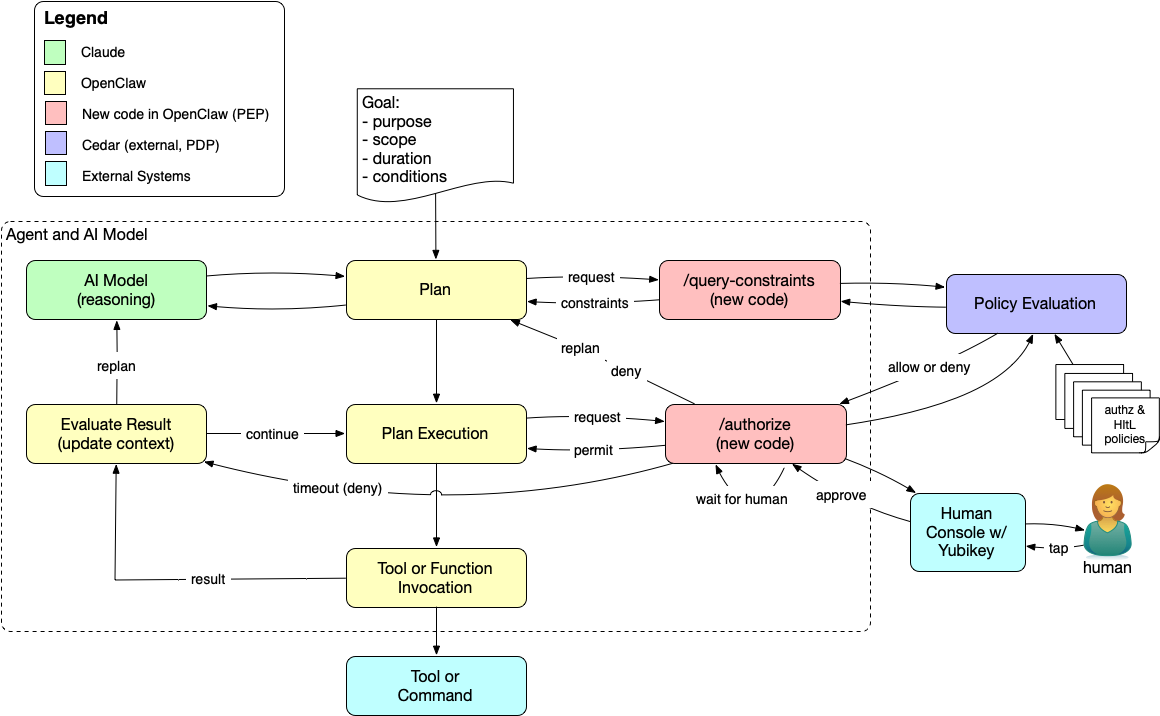
When the agent calls send_email, the PEP asks Cedar for a decision and gets a deny, because no human has approved the message. Cedar doesn't know anything about approval workflows; it just says no. The PEP intercepts that deny and interprets it. Because the tool is send_email, the PEP treats the deny as "not yet" rather than "no," and instead of returning it to the agent, it parks the request and waits for a human.
The human opens an approver page, reviews the recipient, subject, and body, and taps a Yubikey. The PEP then retries the Cedar request with the human's approval injected into the context. This time Cedar returns permit, and the email is "sent," which in the demo means a JSON file lands in a mailbox directory.
If nobody taps the key before the timeout (three minutes by default), the PEP returns a hard deny to the agent and doesn't wait again. You can see this in the diagram as the timeout path that runs from the /authorize box back to the agent's evaluation step. The agent learns that the send didn't happen and can replan or report back, but it can't try again and hope the human is more agreeable the second time.
The Cedar policies that enforce this are short. One permits SendEmail when a verified WebAuthn approval is present and matches the request; the other forbids it otherwise:
@id("hitl-1-allow-send-with-approval")
permit(
  principal,
  action == OpenClaw::Action::"ToolExec::SendEmail",
  resource
)
when {
  context has humanApproval &&
  context.humanApproval.verified == true &&
  context.humanApproval.method == "webauthn" &&
  context has requestHash &&
  context.humanApproval.requestHash == context.requestHash
};
The forbid policy is the same test negated. Since Cedar's forbid always overrides permit, the explicit forbid means that no other permit policy, now or added later, can accidentally open up email sending without a human. The timeout lives in the PEP rather than the policy because Cedar has no notion of the current time; it evaluates the context it's given, which is exactly what makes its decisions predictable.
Notice what the policies don't say. Nothing in them tells anyone to go find a human; Cedar just returns deny, the same answer it gives for any other forbidden action. The PEP is what turns that deny into a request for approval. It intercepts the decision before the agent sees it and interprets a deny on send_email as "waiting for a human" rather than "no." In other words, Cedar decides whether the action is allowed, and the PEP decides what a denial means. That division keeps the policy engine simple and deterministic, but it also means the rule about which denials a human can override lives in code, a point I'll come back to below.
A Passkey for Each Approval
The approval isn't a generic "the human said OK." The demo uses ordinary WebAuthn, the protocol behind passkeys, and binds the challenge to a hash of the specific request. When I tap the Yubikey, I'm signing a statement about this recipient, this subject, and this body. The requestHash check in the policy makes sure the approval Cedar sees matches the action the agent is actually trying to take. If the agent changes a word in the body after I approve, the hashes don't match and the send is denied.
Think about the difference between signing a check and signing a blank check. A blank check says "I trust whoever holds this"; a signed check for a specific amount to a specific payee says "I approve this." Most approval flows for agents are closer to the blank check: the human clicks "allow" once and the agent carries that authority forward. Binding each approval to a single request keeps the human's authority attached to the human's decision. The approval can't be replayed for a different message or stretched to cover the next ten sends.
The "human" part of human in the loop is only as strong as where the passkey lives. On a Yubikey or other roaming hardware key, the credential stays on the device and approval requires someone to physically present the key and touch it. In a software authenticator, like a browser's passkey store or a password manager, the WebAuthn ceremony succeeds just the same, but anything that can unlock that store can approve. The demo asks the browser for a cross-platform authenticator so you'll be prompted for the security key rather than Touch ID. For a while, at least, we don't expect software agents to physically insert and tap Yubikeys. That's the point.
Try It Yourself
The code is in the openclaw-cedar-policy-demo repository on GitHub, and the HItL README walks through running it. Clone the repo, but don't start with the HItL demo. It builds on the earlier ones, so work through the basic Cedar demo first to get the PDP, the PEP, and your OpenClaw configuration in place. The README also includes commands to verify that the earlier demos still pass once the HItL changes are added.
The README covers starting the PDP (which also serves the approver page), registering your Yubikey, and running a set of policy tests that don't need a key at all. The live walkthrough asks the agent to send a simulated email, and then you approve it on the approver page. If you let it time out instead, you'll see the agent receive the denial and no mailbox file appear. I'd recommend trying both; watching the agent handle the timeout says as much about the design as watching the approval succeed.
Shortcuts and the Road to Production
Like the other demos in this series, this one is built to show an architecture, not to run in production. It takes several shortcuts:
- Simulated delivery—No email leaves the machine. An approved send writes a JSON file to
demo/mailbox/sent/, named with a UTC timestamp. - No notification—Nothing tells you a request is waiting. You have to open the approver page yourself and watch for it.
- One gated action, chosen in code—The policies name
SendEmaildirectly, and the PEP is hard-coded to park anydenyonsend_email. Only that one tool requires a human, and the PEP, not policy, decides that adenythere should wait for approval. It will even park a send that some other policy forbids, asking for a tap that can't change the outcome. - One approver on localhost—The PDP serves the approver page, there's a single registered credential, and it has to run on
localhostso the WebAuthn origin matches. - Trust in the authenticator—The demo asks for a roaming authenticator, but nothing verifies that the credential actually lives on hardware.
None of these change the architecture, and each points toward how you'd generalize it into a production system:
- Policy-selected actions—Policy rather than code would decide which actions need a human, perhaps based on resource attributes like sensitivity or on the scope of a delegation. The PEP still interprets the
deny, but it would take its cue from policy. For example, it could park only when every policy behind thedenycarries an annotation like@hitl("required"), or use partial evaluation to confirm that human approval is the only thing standing between the request and apermit. - Approvers as principals—The approver would be a principal in the policy model, so Cedar could say who is allowed to approve what; approving a wire transfer and approving a calendar invite shouldn't require the same person.
- An approval service—A dedicated service would replace the page served by the PDP and push requests to the approver's phone or other device.
- Durable state and audit—The pending store would be durable and every approval would be logged, giving you an audit trail that ties each consequential action to a specific human decision.
- Authenticator attestation—Checking the authenticator's attestation would let policy require hardware keys for the actions that matter most.
- Multiple approvers—Requiring more than one approval is a natural extension of the multi-signature patterns I discussed in It's Not Just What Agents Can Do...It's When They Can Do It!
One more thing matters that no amount of cryptography fixes: the human has to see what they're approving. The Yubikey tap attests to the request hash, but the human decides based on what the approver page shows. If the display summarizes or hides part of the action, the attestation covers something the human never saw. A production approval UI needs to present the action faithfully, which is an old lesson from digital signatures that applies to agents just as well.
Humans Where They Matter
Putting a human in the loop for everything would defeat the purpose of having an agent. People who are asked to approve every action stop reading and start tapping, and a tap without attention is just a slower way of saying yes. The value of this design is that policy decides where the human belongs. Most actions flow through Cedar and never interrupt anyone. The few that carry real consequences stop and wait for a person who can see exactly what's about to happen.
Agents act on our behalf, and the authority they carry is ours. When the stakes are high, the agent shouldn't be able to decide on its own that we would have approved, and it shouldn't be able to argue its way past a prompt that says to ask. Placing the control in the harness, bound to a specific action and a physical key, keeps that decision where it belongs. We can build agents that treat our approval as a formality, or we can build ones where our approval is a real control. The second is harder, but it's the one that keeps people in charge of what's done in their name.
Photo Credit: Human in the Loop from ChatGPT (public domain)